
Description
Running out of storage because the same files are saved multiple times? Sys Tools Duplicate File Finder helps you find and remove unwanted duplicate files from your PC without checking every folder manually.
Duplicate photos, videos, documents, downloads, music files, and other repeated data can make your storage messy and difficult to manage. Instead of searching for each copy yourself, SysTools helps identify duplicate files so you can review them and remove the copies you no longer need.
Find Duplicate Files from Your PC Easily
If you have thousands of files stored across different folders, finding duplicates manually can take a lot of time. Sys Tools Duplicate File Finder is designed to make this cleanup easier.
You can use it to identify duplicate:
Photos and images
Documents and PDFs
Videos
Audio files
ZIP and other archive files
Downloaded files
Other commonly used file types
How Does SysTools Duplicate File Finder Work?
The process is simple and does not require you to check every file one by one.
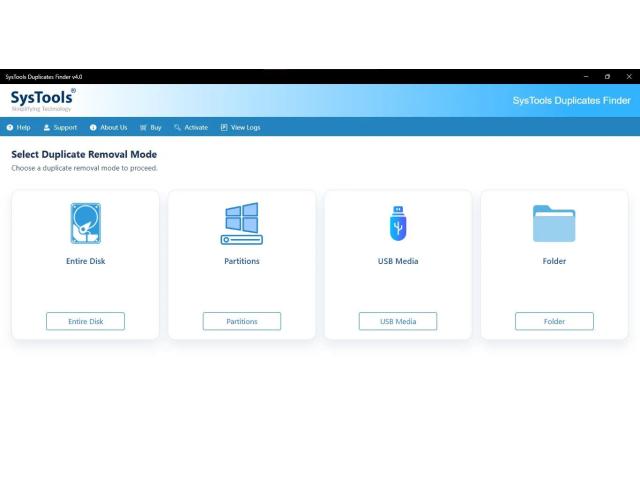
Select the Location Choose the folders, drives, or locations where you want to look for duplicate files.
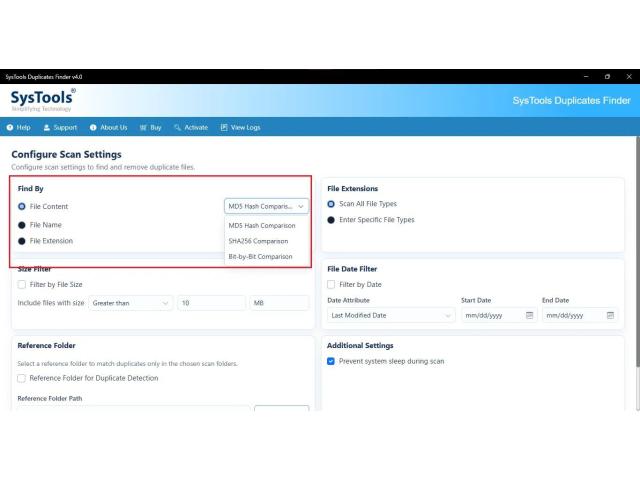
Start the Scan The tool scans the selected locations to identify files that may have identical copies.
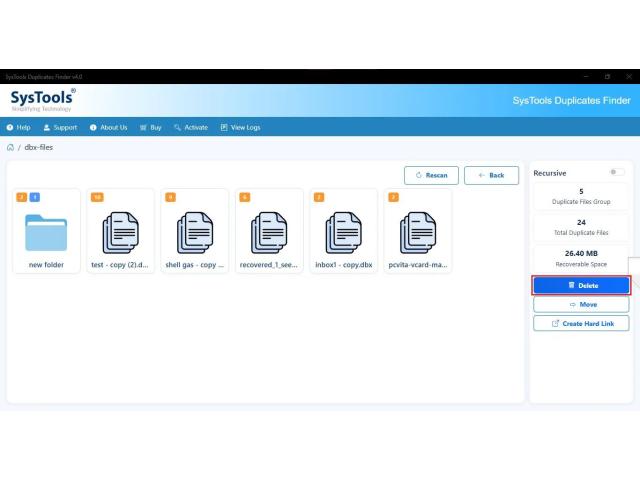
Check Duplicate Results Review the files found during the scan. You can check details such as file name, size, and location before deciding what to remove.
Select Unwanted Copies Choose the duplicate files you no longer need while keeping the original or preferred copy.
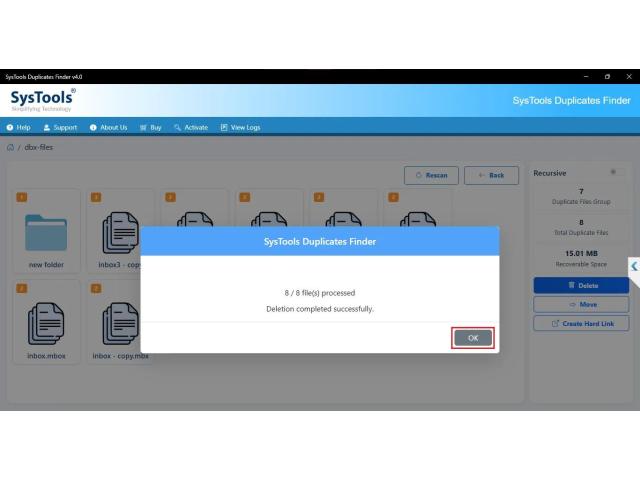
Remove Duplicate Files Remove the selected copies and keep your folders cleaner and more organized.
Why Use a Duplicate File Finder?
Manually searching for duplicates can become difficult when files are spread across multiple folders. A dedicated duplicate file finder can make the process more manageable.
With Sys Tools, you can:
Find repeated files more quickly
Reduce unnecessary file copies
Clean up cluttered folders
Recover storage occupied by unwanted duplicates
Organize personal and work files
Review files before removing them
Clean Up Your PC Without Deleting Important Files
Duplicate cleanup should not mean deleting files without checking them. Always review the scan results before removing anything important.
For work documents, photos, backups, and personal files, check the file location and contents carefully. If two files have similar names but contain different information, they should not be treated as duplicates simply because their names match.
Who Can Use SysTools Duplicate File Finder?
The tool can be useful for users who regularly deal with large collections of files, including:
Home users with full storage drives
Professionals managing work documents
Photographers with large image collections
Students storing study material
Businesses maintaining large file folders
Users who frequently transfer files between devices
Remove Duplicate Files and Keep Your Data Organized
Do not waste time opening hundreds of folders to search for repeated files. Sys Tools Duplicate File Finder gives you a practical way to locate duplicate files, review them, and remove unnecessary copies from your PC.
If your computer has accumulated duplicate photos, documents, videos, downloads, or other files, SysTools can help you start a cleaner and more organized file collection.
Duplicate photos, videos, documents, downloads, music files, and other repeated data can make your storage messy and difficult to manage. Instead of searching for each copy yourself, SysTools helps identify duplicate files so you can review them and remove the copies you no longer need.
Find Duplicate Files from Your PC Easily
If you have thousands of files stored across different folders, finding duplicates manually can take a lot of time. Sys Tools Duplicate File Finder is designed to make this cleanup easier.
You can use it to identify duplicate:
Photos and images
Documents and PDFs
Videos
Audio files
ZIP and other archive files
Downloaded files
Other commonly used file types
How Does SysTools Duplicate File Finder Work?
The process is simple and does not require you to check every file one by one.
Select the Location Choose the folders, drives, or locations where you want to look for duplicate files.
Start the Scan The tool scans the selected locations to identify files that may have identical copies.
Check Duplicate Results Review the files found during the scan. You can check details such as file name, size, and location before deciding what to remove.
Select Unwanted Copies Choose the duplicate files you no longer need while keeping the original or preferred copy.
Remove Duplicate Files Remove the selected copies and keep your folders cleaner and more organized.
Why Use a Duplicate File Finder?
Manually searching for duplicates can become difficult when files are spread across multiple folders. A dedicated duplicate file finder can make the process more manageable.
With Sys Tools, you can:
Find repeated files more quickly
Reduce unnecessary file copies
Clean up cluttered folders
Recover storage occupied by unwanted duplicates
Organize personal and work files
Review files before removing them
Clean Up Your PC Without Deleting Important Files
Duplicate cleanup should not mean deleting files without checking them. Always review the scan results before removing anything important.
For work documents, photos, backups, and personal files, check the file location and contents carefully. If two files have similar names but contain different information, they should not be treated as duplicates simply because their names match.
Who Can Use SysTools Duplicate File Finder?
The tool can be useful for users who regularly deal with large collections of files, including:
Home users with full storage drives
Professionals managing work documents
Photographers with large image collections
Students storing study material
Businesses maintaining large file folders
Users who frequently transfer files between devices
Remove Duplicate Files and Keep Your Data Organized
Do not waste time opening hundreds of folders to search for repeated files. Sys Tools Duplicate File Finder gives you a practical way to locate duplicate files, review them, and remove unnecessary copies from your PC.
If your computer has accumulated duplicate photos, documents, videos, downloads, or other files, SysTools can help you start a cleaner and more organized file collection.



0 Comment